 Jeff Bilbrey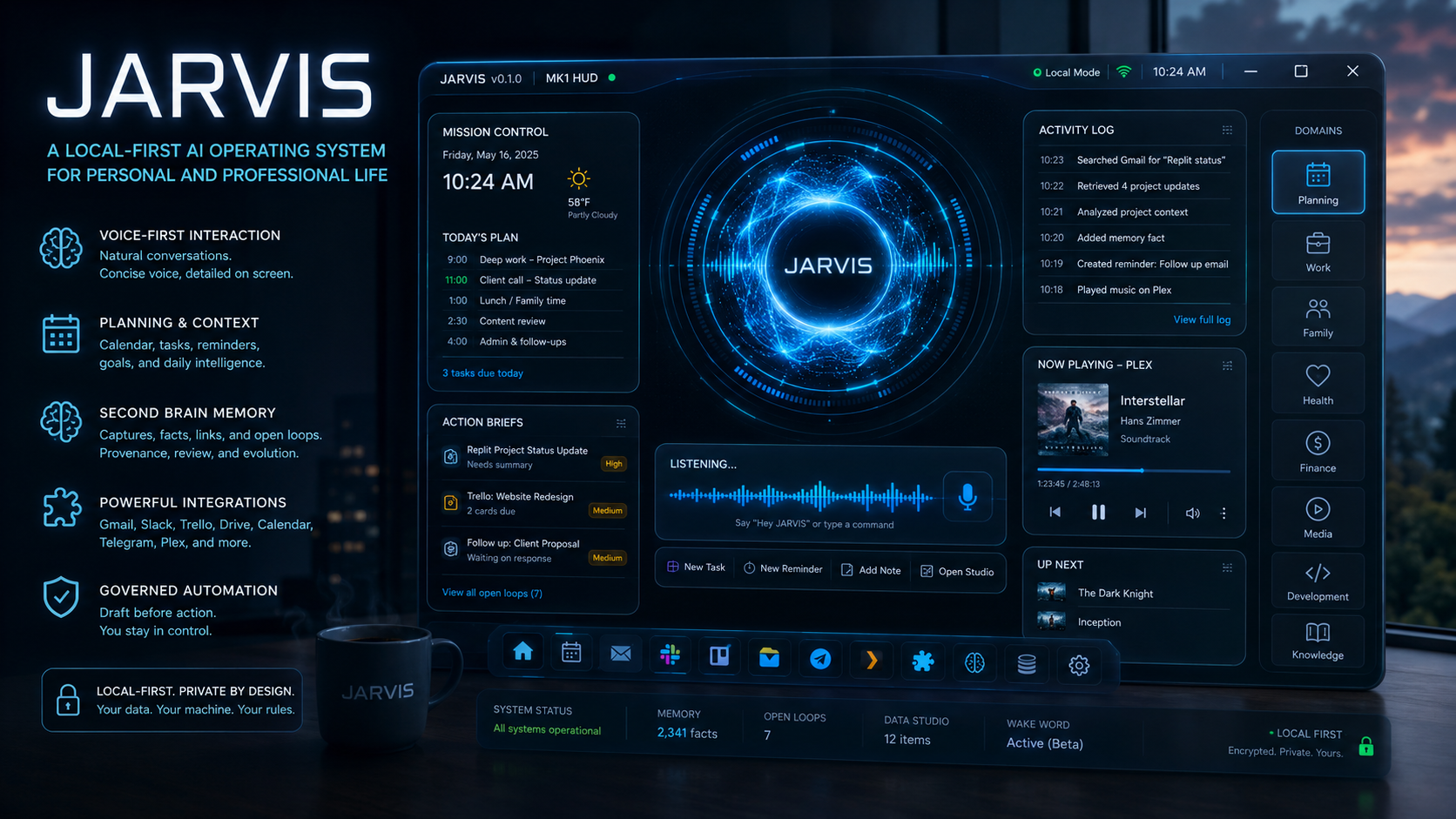
I have been building a personal AI assistant called JARVIS. (View Case Study)
Not a chatbot wrapper. Not just another voice command toy. I mean a real local-first command center that can help me manage my work, family life, projects, reminders, documents, communications, memory, and daily planning.
The project started with a simple idea:
What would it look like if AI actually lived in my workflow instead of waiting in a browser tab?
That question has turned into one of the most interesting things I have built.
Why I Started
Like a lot of people, I use AI constantly. But I kept running into the same limitation: every conversation starts from zero unless I manually bring the context back.
My real life is scattered across:
Gmail,
Slack,
Trello,
Google Calendar,
Google Docs,
project notes,
voice thoughts,
family planning,
reminders,
client work,
status updates,
random ideas that happen while I am doing something else.
ChatGPT is incredibly useful, but it does not automatically know what I am working on, what I promised someone, what changed yesterday, what project is blocked, or what I said during a voice brainstorm.
So I started building something that could.
What JARVIS Is
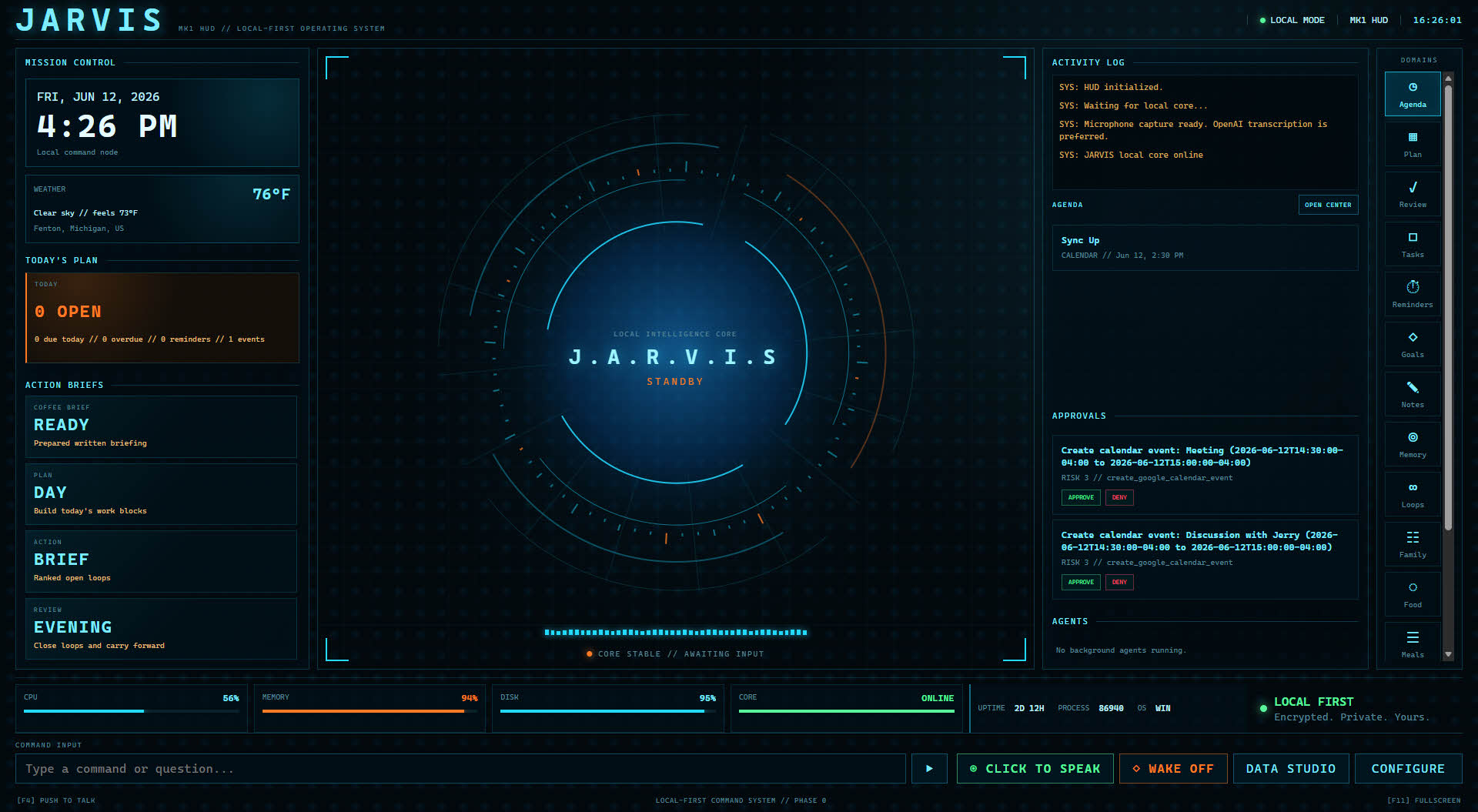
JARVIS is a local desktop AI hub.
It runs on my machine, stores structured data locally, and connects to outside services only when needed. It has a visual HUD, voice input, speech output, local memory, tool integrations, and a growing “Second Brain” system.
Right now, JARVIS can do things like:
take voice commands,
create tasks and reminders,
prepare a morning brief,
help plan my day,
review what is left at night,
search Gmail,
read Slack context,
create Trello cards,
receive Telegram messages when I am away,
manage meal plans and pantry inventory,
remember important facts,
capture brainstorming sessions,
organize open loops,
assemble project status updates.
The goal is not to replace every app I use.
The goal is to connect the context between them.
Local-First, Not Local-Only
One of the key design decisions is that JARVIS is local-first.
The database is local. Memory is local. Settings are local. Credentials are encrypted locally. The system can still use cloud providers like OpenAI, ElevenLabs, Google, Slack, Trello, and Telegram, but those are integrations, not the foundation.
That distinction matters.
I want the assistant to be useful, but I also want to know where my data lives, what it remembers, what it can access, and what actions it is allowed to take.
The Second Brain
The biggest conceptual shift in the project has been moving from “AI assistant” to “AI Second Brain.”
At first, memory was simple: save a note, search a note, write something to a vault.
That was useful, but not enough.
Now JARVIS has a governed memory layer. It can capture raw information, extract durable facts, link those facts back to their source, track open loops, and preserve older versions when something changes.
That means JARVIS can start to understand things like:
what projects I am working on,
who people are,
what decisions were made,
what I am waiting on,
what still needs attention,
what changed recently,
what commitments exist across tools.
This is where the assistant starts to feel less like a chatbot and more like an operating system.
Data Studio
I also realized that not everything should happen through voice.
Voice is great for quick commands and capturing thoughts, but it is not the best interface for complex work. If I need to prepare a status update across multiple projects, I need a central place to gather documents, notes, updates, and direction.
That led to Data Studio.
Data Studio is becoming the workspace where I can collect context, upload files, add notes, review memory, and ask JARVIS to assemble outputs from a richer set of source material.
Think of it like a local AI workspace attached to my personal operating system.
Voice Has to Be Designed Carefully
One funny lesson: just because JARVIS can speak does not mean it should speak everything.
At one point, I asked it a question and it gave a long, useful answer. Technically, it worked. Practically, it was annoying. Listening to a long structured answer out loud is hard to follow.
So I changed the behavior.
Now, if JARVIS has a long answer, it displays the full response in the center screen and only speaks a short summary.
That feels much better.
Voice should be fast, concise, and useful. The screen should handle detail.
Automation Needs Guardrails
Another important principle is that JARVIS should draft before acting.
It can suggest. It can prepare. It can assemble. It can create drafts. But if an action affects the outside world, I want approval.
That includes things like sending messages, modifying calendar events, or making changes in connected services.
The goal is useful automation without giving up control.
What I Have Learned
The biggest thing I have learned is that building a useful AI assistant is not really about prompts.
Prompts matter, but the hard part is the system around the model:
memory,
retrieval,
UI,
latency,
source tracking,
permissions,
action approval,
integrations,
voice design,
error handling,
trust.
The model is the reasoning layer. The product is everything else.
Where It Is Going
The next steps are focused on making JARVIS more reliable and more useful in daily work.
I am working on:
better wake-word detection,
local voice activity detection,
deeper Second Brain review workflows,
better project and status update tooling,
local LLM support,
richer Data Studio workflows,
more polished HUD interactions.
The long-term vision is a personal AI operating system that knows enough about my world to help meaningfully, but is still inspectable, local-first, and governed.
Final Thought
This project has made me believe that the future of AI assistants is not just smarter models.
It is context.
It is memory.
It is tools.
It is trust.
And most importantly, it is putting all of that into an interface that actually fits how a person lives and works.
That is what I am trying to build with JARVIS.